What a Landscaping Visualizer Does—and Why It Changes Everything
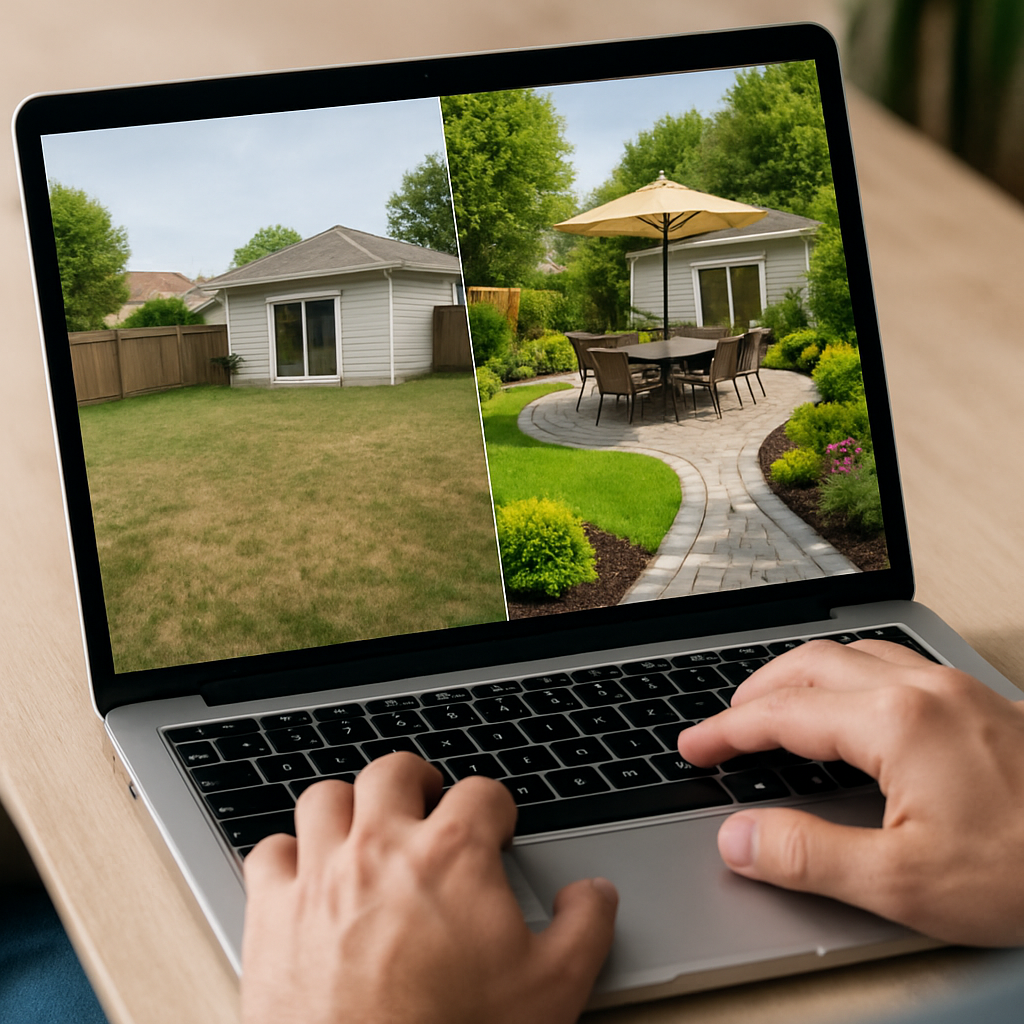
A landscaping visualizer is a powerful planning tool that transforms ordinary yard photos into lifelike previews of patios, gardens, and outdoor living spaces. Instead of guessing how a cedar pergola will pair with bluestone pavers—or whether drought-tolerant grasses will complement an existing fence—homeowners, designers, and real estate pros can explore styles, materials, and layouts before lifting a shovel. This shift from imagination to visualization reduces risk, speeds up decisions, and aligns everyone involved, from family members to contractors.
Traditional landscape planning often starts with sketches and mood boards. While helpful, those tools can leave gaps between concept and reality. An AI-powered visualizer closes that gap by generating multiple concepts from the same scene, so it’s easy to compare a modern, low-maintenance courtyard against a cottage-style garden with climbing roses and gravel paths. Seeing these variations in context—your light, your slope, your siding color—provides a level of confidence 2D drawings can’t match.
Visualization is also a budget-friendly safeguard. Outdoor projects involve many interdependent choices: plant palettes, hardscapes, drainage, lighting, privacy, and traffic flow. Swapping a concrete pad for permeable pavers, or moving a fire feature away from prevailing winds, is far cheaper on a screen than after concrete cures. By reviewing concepts early, it’s possible to catch scale issues—like a patio that’s too small for dining—before materials are ordered. The result is fewer change orders and a smoother build.
Local realities matter, too. Different regions face different constraints: freeze–thaw cycles in colder climates, irrigation limits in arid zones, heavy rainfall in coastal areas, and HOA guidelines in master-planned communities. A visualizer helps anticipate these factors in the design narrative. For instance, a rendering can show how a bioswale or a dry riverbed feature integrates drainage, or how native shrubs can frame a mailbox while conforming to height rules. When a plan looks intentional and climate-aware, approvals and bids tend to go faster.
Finally, a landscaping visualizer is a communication catalyst. It turns abstract wish lists—“somewhere to grill,” “more shade,” “a dog-friendly area”—into images everyone can react to. That clarity streamlines conversations about must-haves versus nice-to-haves, identifies staging for multi-phase builds, and gives contractors a clear brief that reduces ambiguity when quoting labor and materials.
Step-by-Step: Getting Exceptional Results from an AI Landscaping Visualizer
Great outputs start with great inputs. Before generating designs, capture clear, well-lit photos from multiple angles. Photograph the yard at roughly eye level, and include key reference points—door thresholds, windows, fences, or existing trees—so scale feels accurate. Tidying up clutter helps the visualizer “see” clean edges and surfaces, but don’t hide fixed elements like AC units or slopes that the plan must address.
Define goals in plain language. Identify what the space needs to do, who it’s for, and the upkeep you’re comfortable with. For example: “A modern lounge area for six, partial shade in the afternoon, low-maintenance plants, secure for a 40-pound dog, and a grilling zone near the kitchen door.” Practical prompts help an AI tool propose layouts, materials, and planting schemes aligned with real life—not just aesthetics.
Clarify constraints early. Note HOA or municipal rules (fence height, set-backs, materials restrictions), water use limits, local wildlife pressure (deer, rabbits), and climate (USDA zone, frost dates, sun patterns). If slopes, drainage, or utility easements exist, mention them. When possible, add simple measurements: the width of a side yard path or the depth available for garden beds. These details guide smarter concept generation and reduce revisions later.
Explore multiple styles to stress-test your preferences. Try a clean-lined courtyard with porcelain pavers and corten edging, then compare it to a Mediterranean palette of terracotta pots, pea gravel, and olive-tone shrubs. In many cases, blending elements from two or three concepts yields a custom style—say, a modern layout softened by native perennials for pollinators. Iteration is where a landscaping visualizer shines; treat early drafts like fittings, not final garments.
Use side-by-side comparisons to weigh trade-offs. A larger deck might reduce lawn care but require more upfront cost; a permeable path controls runoff but changes the crunch-underfoot experience; an evergreen hedge adds year-round privacy but affects airflow and light. Evaluate maintenance cycles, heat reflection around seating areas, slip resistance near pools, and how sun/shade slices across the yard at different times of day. When in doubt, test scenarios rather than guess.
Once a direction feels right, share your visuals with pros for feedback and bids. Contractors respond well to images that show intent—where grills vent, how foot traffic flows from doors, where irrigation lines might need to run—even if final material specs change. For those wanting a user-friendly option to try today, a landscaping visualizer lets you upload a yard photo, describe the changes you want, and generate realistic concepts quickly, so stakeholders can align before any demolition or plant purchases begin.
Real-World Scenarios, Styles, and Pro Tips for Smarter Outdoor Plans
Backyard lounge with privacy and shade: Urban and suburban lots often prioritize seclusion without making spaces feel boxed in. A visualizer can test layered screening—ornamental grasses, a slatted cedar panel, and a multi-stem serviceberry—so the composition screens sightlines while letting breezes through. Renderings also help place shade sails or pergolas to block harsh afternoon sun without overshading herb planters or solar path lights.
Drought-tolerant refresh in dry climates: In regions facing water restrictions, switching to native or climate-adapted plants is both sustainable and stylish. With visualization, it’s easy to try decomposed granite walkways, raised steel-edged beds, and drip-irrigated islands of color using salvias, penstemons, and succulents. Side-by-sides can show how mulch textures—shredded bark vs. gravel fines—affect heat buildup and visual contrast against stucco walls or dark fences.
Family- and pet-friendly yards: Homes with kids and dogs benefit from clear circulation and durable materials. Use the tool to test turf layouts that keep play zones open, place hose bibs strategically, and separate mulch beds from running paths so bark stays put. Visuals can reveal where gates, step lighting, and hose storage make everyday life easier. They also help map where not to put delicate plantings that would struggle with ball games or zoomies.
Curb appeal for resale: For sellers, quick wins often come from improving the front approach. Visualization can refine the proportions of a new walkway, balance foundation plantings with the home’s architecture, and identify color echoes—like matching a door’s hue with spring-flowering shrubs. Because the before/after pictures are compelling, they can guide small projects (paint, planters, lighting) that add perceived value without a full renovation.
Small-space makeovers and narrow side yards: Tight footprints demand smart layering. A visualizer helps select vertical elements—trellises, espaliered fruit trees, or wall-hung planters—to create depth. It also previews the scale of cafe tables, modular seating, and storage benches to avoid crowding. Testing 24-inch vs. 36-inch path widths on screen prevents awkward bottlenecks later, and rendering nighttime scenes clarifies where low-voltage lights add safety and drama.
Phased projects and budgets: Many outdoor transformations happen over several seasons. Visuals can establish a master plan while identifying which pieces to build first—perhaps grading and a main patio in phase one, then a fire bowl and planting in phase two, followed by a small water feature. This sequence minimizes rework and lets homeowners allocate budget intentionally. Because the big picture stays in view, each phase snaps into place rather than feeling like a patchwork.
Regional considerations and durability: Designs respond to geography. In the Southwest, test cool-toned hardscapes to temper heat and integrate shade structures positioned for afternoon relief. In the Pacific Northwest, preview rain gardens, moss-friendly joints, and cedar tones that play well with evergreens. In cold climates, visualize materials with good freeze–thaw performance and choose plantings that provide winter structure—such as redtwig dogwoods or tall grasses—to keep the yard interesting year-round.
Pro tips for sharper outputs: Use strong, descriptive prompts that mention style (“modern farmhouse,” “coastal contemporary”), function (“seating for eight,” “grill wind protection”), and care level (“low-maintenance,” “pollinator-friendly”). Reference materials by color and texture—“charcoal porcelain pavers,” “buff limestone,” “warm cedar”—and mention existing finishes for cohesion. When a concept is close, iterate by asking for small moves: widen the steps, soften edges with groundcovers, add a second seating node. Subtle refinements compound into a design that feels tailored, purposeful, and build-ready.

Karachi-born, Doha-based climate-policy nerd who writes about desalination tech, Arabic calligraphy fonts, and the sociology of esports fandoms. She kickboxes at dawn, volunteers for beach cleanups, and brews cardamom cold brew for the office.